Node.js 26 Is Now LTS. Should You Upgrade This Week?
Node.js 26 entered LTS on October 28, 2026. See what changed, how long older releases remain supported, and what to check before upgrading.
In this piece
What changed
Node.js 26 entered LTS on October 28, 2026, with version 26.13.0. The announcement describes metadata updates only relative to 26.12.1.
Why it matters
Support dates help teams prioritize upgrades. LTS status does not certify an application or its dependencies.
Node.js 26 entered long-term support on October 28, 2026, with version 26.13.0, codenamed Lithium. For a new server application, it is a sensible release line to evaluate. For an existing application on a supported Node.js release, the announcement is a reason to plan and test an upgrade, not a reason to skip compatibility checks.
The immediate change is support status. The release announcement says 26.13.0 contains no further changes from 26.12.1 beyond metadata updates reflecting LTS. A project moving from Node.js 22 or 24 still crosses major-version changes accumulated before that announcement.
What changed on October 28?
Node.js runs JavaScript outside the browser, including web servers, command-line tools, and build systems. Its release lines have support phases so teams can distinguish a release intended for broad production use from one earlier in its lifecycle.
The 26.13.0 announcement confirms the transition and says the 26.x line will receive updates through the end of April 2029. That commitment applies to the release line. It does not mean installing 26.13.0 once and ignoring later fixes is a maintenance plan.
This article was researched on November 6, 2026. Release status and schedules should be checked again when you approve a migration, especially if the work happens months later.
Does this make Node.js 24 obsolete?
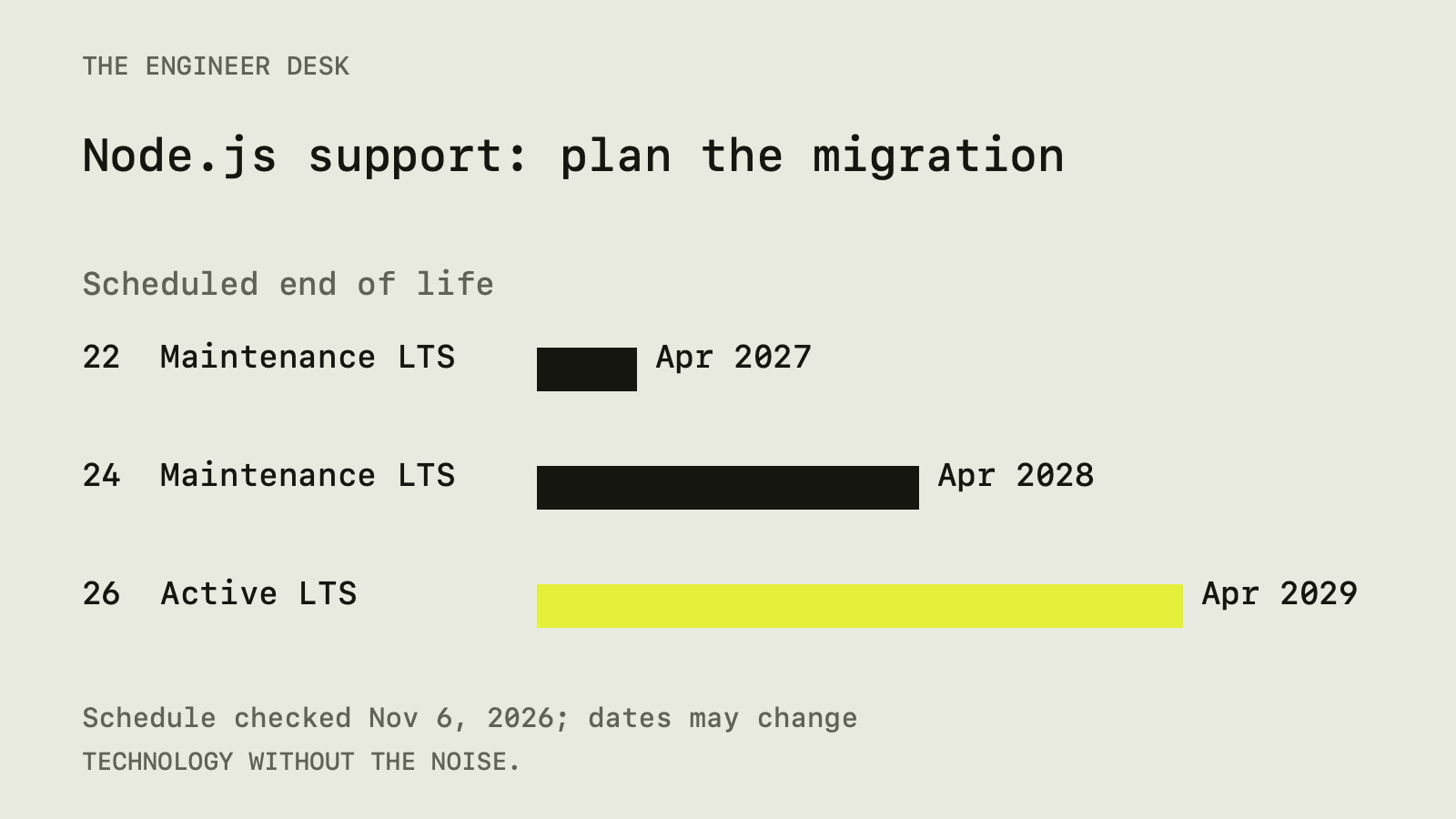
No. The Release Working Group's schedule lists Node.js 24 in Maintenance LTS, with an end-of-life date of April 30, 2028. Node.js 22 is also in Maintenance LTS, with end of life scheduled for April 30, 2027. Node.js 26 is in Active LTS, with end of life scheduled for April 30, 2029.
Those are published schedule dates, and the project notes that dates can change. Maintenance LTS remains a supported phase, although its focus differs from Active LTS.
| Your situation | A practical next step |
|---|---|
| Starting a new application | Evaluate Node.js 26 against your framework and host |
| Running a healthy Node.js 24 application | Schedule compatibility testing and a deliberate migration |
| Running Node.js 22 | Give the migration a nearer deadline because support ends sooner |
| Running an unsupported release | Prioritize a move to a supported line and investigate blockers |
These are editorial recommendations based on the support schedule, not a claim that every application should choose the same version.
LTS does not certify your dependencies
Long-term support describes Node.js maintenance. It does not establish that your framework, database driver, native add-on, or hosting platform supports that version.
Start with the project's declared runtime requirements and the dependency maintainers' compatibility notes. A dependency may install successfully but behave differently at runtime. A package with a native component may also need an appropriate prebuilt binary or a working local build toolchain.
Do not change several major dependencies at the same time unless the runtime upgrade requires it. A smaller change makes it easier to identify which component caused a regression.
For an unfamiliar codebase, first establish a baseline on the current runtime. A failing test discovered after upgrading is difficult to interpret if nobody knows whether it already failed before the change.
Inspect the environment that actually runs the code
Your laptop's node --version does not establish the runtime used in production. Check the deployment platform, container image, build job, server process, and scheduled workers separately.
A static website can also depend on Node.js during its build even when the public site serves only HTML, CSS, and JavaScript files. In that case, inspect the build environment and generated output. A server application additionally needs runtime checks after deployment.
The Node.js 26 release notes provide the starting point for reviewing changes introduced with the major release. Read changes relevant to your application rather than relying only on the later LTS announcement.
One Linux detail deserves attention
The 26.13.0 announcement notes that official Linux binaries have linked against libatomic since Node.js 25. Depending on the Linux distribution, that library may need to be installed separately.
This is particularly relevant when moving from an older LTS release or building a minimal container image. Check the actual base image and distribution documentation. Do not paste a package-manager command for a different distribution into a deployment script.
A startup check in the same kind of environment used for deployment is more informative than an installation that succeeds only on a developer's computer.
Keep the upgrade reproducible
Record the intended runtime in the version-management files and platform settings your project already uses. Avoid creating several conflicting sources of truth. Confirm that CI and the deployment platform honor the configuration you changed.
Keep the dependency lockfile under review. For npm projects, the npm ci documentation explains how a clean install uses the lockfile and fails when it disagrees with the package manifest. That helps distinguish a runtime migration from an accidental dependency refresh.
A lockfile does not fix every environmental difference. Operating systems, architecture, native tools, and install-time scripts can still matter. Record the environment used for the migration checks so another maintainer can reproduce them.
Test the paths that make the application useful
Run the project's focused checks, then exercise its important behaviors in staging. For a web application, that might include startup, login, database access, file uploads, and a background job. Choose paths based on what the application actually does.
If the application builds public pages, inspect the generated routes and metadata. If it connects to external services, use development credentials and confirm that the staging configuration points to development targets.
Compare errors and response behavior with the baseline. Avoid claiming a speed improvement without a measurement designed to support that claim. The LTS designation itself provides no benchmark for your workload.
A separate Git worktree can make the migration easier to inspect alongside the current version. Remember that both directories may still share a database or queue.
Prepare a rollback before changing production
Keep the previous deployment artifact and runtime configuration available through the platform's normal release process. Know which signal would trigger a rollback and who is responsible for watching it.
An application rollback may not reverse a database migration or an external action. Keep unrelated schema changes out of the runtime upgrade where possible. If a dependency requires a migration, assess its reversibility separately.
Start with a limited deployment when your infrastructure supports it. Confirm startup and important behavior before broadening the release. Continue monitoring after the first successful request because scheduled work may fail later.
The decision for this week
For new work, Node.js 26 LTS deserves a compatibility check and a place in the runtime decision. For existing work on Node.js 22 or 24, use the published support dates to set a migration deadline, then validate the application in its real environment.
The useful outcome is a supported runtime with evidence that your application works on it. The October 28 announcement makes that planning clearer. The migration still belongs to the team operating the software.
Sources
- Node.js 26.13.0 (LTS), Node.js project (nodejs.org)
- Node.js release schedule, Node.js Release Working Group (github.com)
- Node.js 26.0.0 (Current), Node.js project (nodejs.org)
- npm ci command reference, npm (docs.npmjs.com)
Spot an error? Tell us. See how we handle sources and corrections in our editorial standards.
Found this useful? Get The Weekly Desk, one concise email a week.