Meta Muse at Walmart: What Your Agent Spending Limit Actually Controls
A spending limit lets Muse check out at Walmart without asking you. Walmart's own terms say the limit is not a promise. Here is what to set before Black Friday.

In this piece
What changed
On November 23, 2026, Walmart's Agent Gateway went live with Meta's Muse, so Muse can build a Walmart cart and check out through an Agent Profile in your Walmart account.
Why it matters
With a spending limit on, Muse can complete some orders without asking you first, and Walmart's terms leave the agent's mistakes with you and the agent's maker.
A Walmart spending limit lets Meta's Muse check out without asking you, as long as the order fits your settings. It does not make the agent pick the right item. Walmart's own terms say the limit is not a promise that any agent will follow it. For Black Friday week, keep the default: approve every purchase yourself.
Personally, I wouldn't enable an automatic spending limit just yet. I'd rather have Muse do the research, compare products and build my cart, while keeping the final purchase decision in my hands.
Meta Muse at Walmart: the short answer
- The default is safe. Every agent purchase needs your approval unless you turn on a limit.
- A limit removes the question, not the risk. Inside your limit, Muse can buy without asking you.
- You own the order. Walmart's returns process still applies, but Walmart's terms say it is not liable for what an agent chooses.
What launched on November 23
Walmart [1] on October 21. Each AI agent you use gets its own profile inside your Walmart account. Its orders show up separately from yours.
On November 23, [4] that Muse is the first agent live on Walmart's Agent Gateway. The gateway is Walmart's direct connection for agents, so they do not have to click through the website like a person. Walmart's steps, as The Verge quotes them:
- Tell Muse what you need, such as a TV deal.
- Muse sends you to Walmart to sign in. The first time you add something to the cart, you set up the Agent Profile, including a spending limit.
- Check out inside the Muse chat, using a card saved in your Walmart account.
Walmart says agents see the same prices you would see on Walmart.com. Its [3] still calls the program an invitation-only early beta, and says features may change.
What the spending limit does
Walmart's [2] call your settings a "User-Defined Guardrail." The terms say it may let you set:
- a spend limit per transaction
- category or department limits
- how often the agent can buy
Walmart's announcement gives $50, $100 or $200 as example limits. Those are examples, not fixed tiers.
Here is the part that matters. Outside the gateway, Walmart requires a person to approve every agent checkout. Inside the gateway, Walmart may let the agent check out on its own when the order fits your guardrail. If an order goes over it, Walmart may ask you to approve that one order instead of refusing it. Walmart can also ask for approval even when an order is inside your limit.
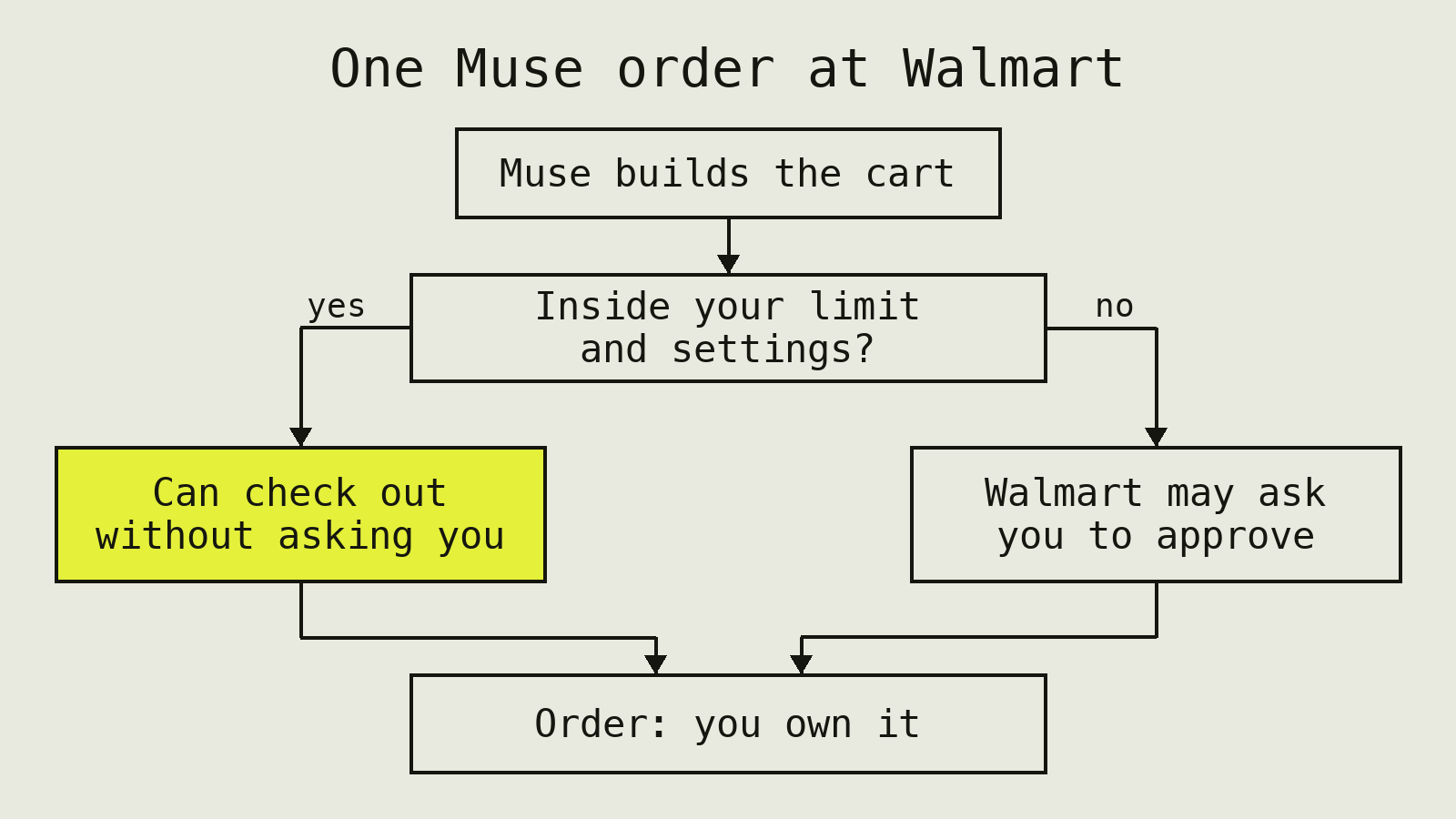
So a limit is a permission slip. It answers one question: may the agent buy this without asking me first?
What the limit does not do
The limit says nothing about whether the order is right. A $40 order of the wrong size fits a $50 limit.
Walmart's terms are blunt about this. The guardrail "is not a representation, warranty, or undertaking by Walmart that any Agent will comply with it." Walmart also says it is not liable for an agent's product or quantity choices, delivery choices, or substitutions. The terms put the agent's conduct on you and on the company that makes the agent, Meta in this case.
Three more limits are worth knowing:
- It may not be a budget. The terms describe a per-transaction limit. Unless you also see a frequency setting, ten $45 orders could each fit a $50 limit.
- It does not cover the agent's reading. Muse can still misread "the cheaper one" or pick a near match.
- It is not proof Muse is reliable. A Tom's Guide writer said only 3 of 7 deal prompts worked well in their trial.
What protects you anyway
Some protections hold whatever limit you pick:
| Protection | What Walmart says |
|---|---|
| Your card number | The agent never receives your stored card data. |
| Payment methods | Only you choose the card. The agent cannot add or change one. |
| Prices | Same prices as Walmart.com, with fees shown before purchase. |
| Returns | Walmart's returns process applies, including when an agent does not act as intended. |
| Your legal rights | The terms do not limit your return, refund or dispute rights. |
| Turning it off | You can delete an Agent Profile at any time. |
These come from Walmart's announcement and its terms. Walmart also says you stay the responsible account holder for payment, returns and disputes.
The trade-off
Approving every purchase costs you one tap per order. A limit saves that tap, and you only notice the mistakes after they ship.
On a normal week, a small limit for repeat items can make sense. Think paper towels or the milk you always buy. Walmart says the gateway can help an agent find your usual items without handing over your wider order history.
Black Friday is different. Deals sell out, listings change fast, and near matches are everywhere. That is when an agent is most likely to grab the wrong model.
Our recommendation
- Most people: keep "approve every purchase" on through Cyber Monday. Read each approval like a receipt.
- Repeat household items: after the holidays, try a low limit and check the orders for two weeks.
- Big purchases: let Muse find and compare. Buy the TV yourself.
If you already use ChatGPT Wallet, notice the difference. There, you approve each purchase and Wallet asks again if an important detail changes. At Walmart, a limit can remove the per-order approval completely. The same thinking we use for AI coding agent permissions applies: give the least access that still saves you time.
[FOUNDER: one line on whether you would turn on a limit yourself, and why.]
Use Muse to build the cart, then decide yourself
You can get most of the value without letting Muse pay. Ask it to build a cart and stop. Paste this into Muse. It also works in other shopping agents.
ROLE: You are a careful personal shopper who checks every detail before suggesting a purchase.

CONTEXT: I am shopping Black Friday deals at Walmart. I want you to find and compare items, then stop before checkout so I can decide.

MY INPUT:
- What I need: [DESCRIBE THE ITEM, e.g. a 55-inch 4K TV for a bright living room]
- My budget, including shipping and tax: [MAX TOTAL, e.g. $400]
- Must have: [NON-NEGOTIABLES, e.g. HDMI 2.1, arrives before December 5]
- Avoid: [WHAT YOU DO NOT WANT, e.g. refurbished, marketplace sellers]

STEPS:
1. Find up to three options at Walmart that meet every must-have.
2. For each, check who sells it (Walmart or a marketplace seller), the exact model number, and the delivery date.
3. Compare them against my budget and my must-haves, and say which one you would pick and why.
4. Check your own work: confirm each detail against the product page, not a search snippet.

OUTPUT: A table with columns: option, exact model, seller, price, delivery date, meets must-haves (yes/no), link. Then one sentence with your pick.

RULES:
- Do not check out, place an order, or change any account setting. You may add items to my cart only if I say "add it".
- If a price or detail is not on the product page, mark it UNVERIFIED.
- If something is missing or unclear, ask me before you start.
Then open the cart and buy it yourself, or approve Muse's checkout after reading every line. For checking any claim an AI gives you, our guide to using AI for research without fake facts has four quick checks.
After any agent order: a three-step check
- Find the agent's orders. Agent orders appear under the agent's profile, separate from yours. Compare the item, size, quantity, seller and address with what you asked for. [FOUNDER: confirm the exact menu path in your Walmart account.]
- Return what is wrong, quickly. Walmart says its normal returns process applies when an agent gets it wrong. Start the return in your Walmart account as you would for your own order.
- Turn it back down. After the sale, delete the Agent Profile or switch back to approving every purchase. You can set it up again next time.
What Walmart has not said yet
- Whether a limit counts tax and shipping, or only the item price.
- Which guardrail settings launch first. The terms say Walmart "may" offer per-transaction, category and frequency limits.
- What happens to an order already in progress if you delete the profile.
We will update this piece when Walmart or Meta publishes customer help pages.
Frequently asked questions
Does Muse see my credit card number?
No. Walmart's terms say an agent never receives your stored card data and cannot add or change your payment methods. Checkout uses a card already saved in your Walmart account.
Is the Walmart spending limit per order or per month?
Walmart's terms describe a per-transaction spend limit, with a possible separate setting for how often the agent can buy. Walmart has not published a monthly budget option. Check the settings on your own Agent Profile.
What if Muse buys the wrong thing?
Walmart says its returns process applies, including when an agent does not act as intended. Its terms also say Walmart is not liable for an agent's product choices. You start the return.
Does an AI agent pay different prices at Walmart?
Walmart says no. Agents see the same prices a person sees on Walmart.com, with fees shown before purchase.
Do I need Walmart+ to use Muse at Walmart?
[5], citing TechCrunch, reported that Walmart+ is not required. Walmart's own pages do not mention it, so check when you sign in.
Can Muse shop at Amazon?
Not right now. Amazon blocked Muse in September, according to reporting by Axios cited by The Next Web.
Sources
- Walmart Makes It Possible for Agents to Shop on Behalf of Customers, While Keeping Customers in Control, Walmart (corporate.walmart.com)
- Walmart Agentic Access Terms (Version October 21, 2026, with Addendum 1), Walmart (walmart.com)
- Walmart Agent Gateway, Walmart (walmart.com)
- Meta Muse can do your Black Friday shopping at Walmart, The Verge (theverge.com)
- Walmart will let AI agents shop for you, with their own spending limits, The Next Web (thenextweb.com)
Spot an error? Tell us. See how we handle sources and corrections in our editorial standards.
Found this useful? Get The Weekly Desk, one concise email a week.