ChatGPT Wallet Can Pay. What Does Your Approval Allow?
Your approval lets checkout continue. The shop still has to accept the order. Here is what to check before and after an agent pays.
In this piece
What changed
OpenAI announced ChatGPT Wallet on November 13, 2026, with an initial rollout in dots for eligible US Pro users.
Why it matters
Buyers need to distinguish approving a payment from receiving confirmation that an order was placed.
ChatGPT Wallet lets your AI helper pay for an order after you review it. You check the seller, items, total, and card, then approve with a face or fingerprint check. After that, look for the shop's order confirmation. Your approval alone does not mean the order went through.
The current rollout works through dots, OpenAI's personal AI helpers, for eligible US Pro users. It is not available in regular Chat, Work, or standalone Codex threads. Check the eligibility section below before looking for it in your account.
ChatGPT Wallet approval: what you need to know
- Before paying, check the exact order and any later charges you are agreeing to.
- After paying, get the seller's order reference before trying the purchase again.
- For a subscription, check the renewal price and how to cancel.
OpenAI [1]. You add an eligible card once. When you approve a purchase, Wallet supplies a payment token: a substitute for your actual card details. The agent uses that substitute to pay.
Think of the approval screen as your last order check. The agent may have done the searching, but you still need to read what it picked.
Follow one purchase from request to receipt
Suppose you ask for a black backpack that fits your laptop and arrives before a trip. The agent finds one and prepares checkout. Before approving, compare its choice with your request.
| Check | What to look for |
|---|---|
| Seller | Is this the shop you meant to buy from? |
| Item | Right model, size, color, and quantity? |
| Cost | Total with shipping, tax, and fees? |
| Delivery | Right address and arrival date? |
| Payment | Right card and any recurring terms? |
The [3] tie your approval to the details shown. If an important detail changes before the order is submitted, Wallet asks for approval again.
If the backpack comes in two sizes, read the selected size. If your deadline matters, check the arrival estimate. If the total is higher than your budget, pause. A product that looks close to your request may still be the wrong order.
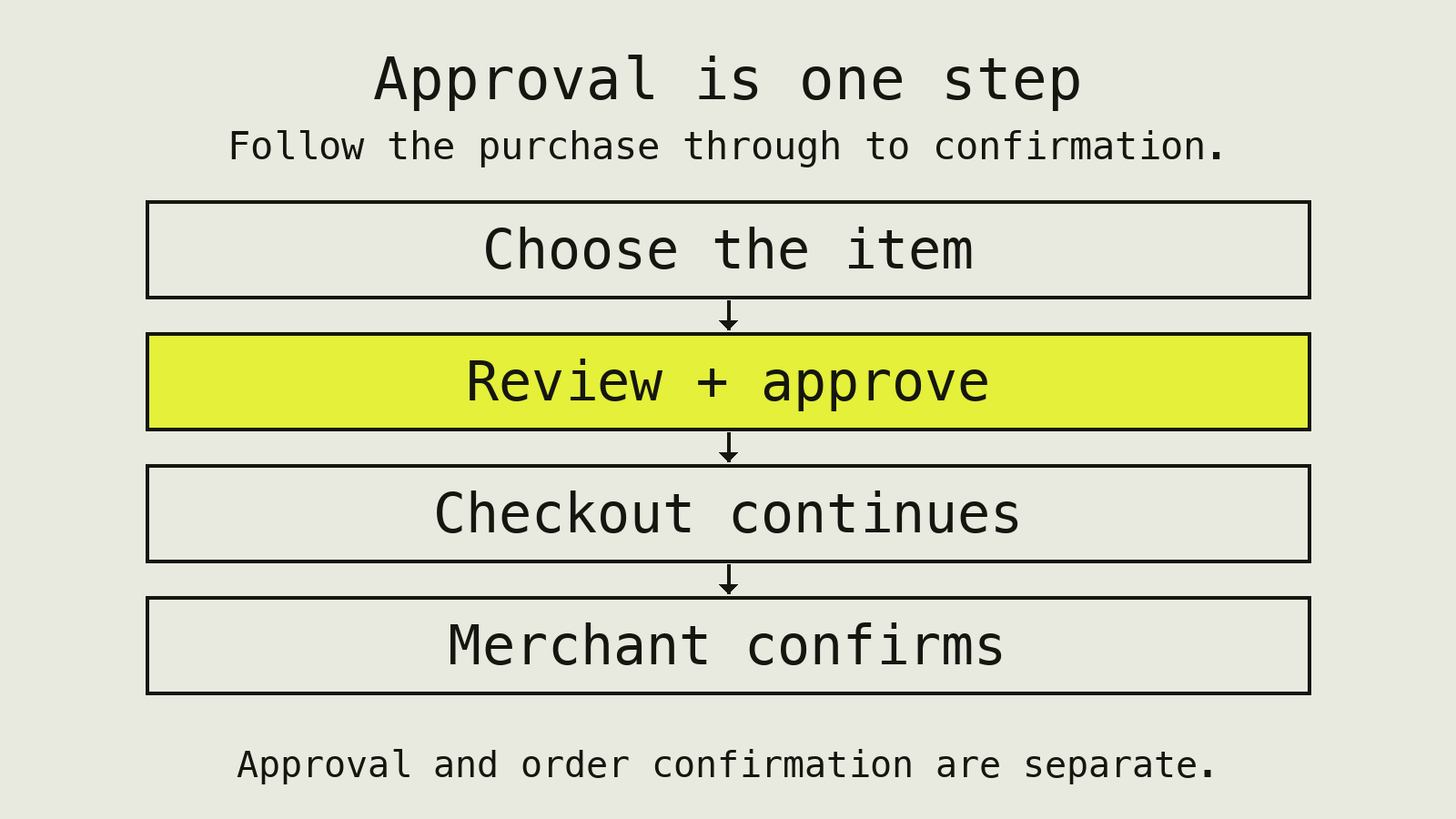
What happens after you approve?
The agent continues checkout. The shop and your card issuer can still reject the payment or order. An approval screen shows what you authorized; the shop's confirmation tells you whether it placed an order.
OpenAI's [2] says Ready to check out means approval is complete. If the result is unclear, check the seller's order status or receipt before retrying.
For the backpack example, look for a confirmation with an order number and the right item. Keep it with the details you approved. If the chat stops midway, check with the shop before asking the agent to buy again.
This is a useful habit for any agent that takes action: decide what proof you need before it starts. For a purchase, the final chat message is only part of the record.
Can a shop charge you again?
Yes, when you agree to a recurring payment plan. OpenAI's [5] supports subscriptions through a shop's existing checkout. That consent is different from permission to use the payment details for an unrelated purchase.
Read the renewal terms before approving a subscription. Check when it renews, the later price, and how to cancel. Put those details next to the first payment in your notes.
Ask yourself: would I still choose this if I had to manage the renewal myself? If an unclear condition changes your answer, resolve it before approving.
What information does Wallet keep?
Hiding your actual card number does not erase the purchase record. OpenAI's [4] lists order details, delivery information, payment status, and approval records among the information involved. The shop and payment providers receive information needed for the order.
The notice says OpenAI does not sell Wallet information or share it for targeted ads. Other parties handle information under their own policies when acting for their own purposes.
That gives you a separate choice to make: whether you want this service involved in this purchase. Review what you share, especially if the order includes personal delivery details.
Who handles a problem?
Use the help page's support routes:
- For delivery, cancellation, or a refund, contact the shop.
- For a declined, pending, or unrecognized charge, contact your card issuer.
- For a stuck Wallet flow or an order that differs from your approval, contact OpenAI Support.
Keep the order reference, time, and error message. Enter card details only in the secure card form. Do not paste a full card number or bank verification code into chat.
What should a business check?
If you run a shop, OpenAI's [6] treats finding products, opening the website, signing in, and paying as separate steps. Your listing may be reachable while checkout still fails.
The merchant payment guide says Wallet works with existing payment forms without a Wallet-specific integration. It also notes that bot detection and payment checks can block agent purchases. Check the full path through to an order reference.
Our Businesses in ChatGPT guide explains what you can control about your listing. For builders handling repeated order requests, our webhook retry guide covers ways to prevent the same action from happening twice.
Who can use it now?
As checked on November 16, you must be an eligible Pro user aged 18 or older in the US. You also need a US billing address, a supported US-issued card, and a supported device for biometric approval. That means a face or fingerprint check. Access is rolling out gradually, so an eligible account may still have to wait.
The launch announcement describes future plans for letting agents buy within set limits. Current help instructions require you to review and approve each purchase. Broader wording in the terms does not establish that advance approval is available as a product feature today.
For your first purchase, choose an item with a clear description and total. Keep your request, approved order, and shop confirmation together. Check that all three agree.
Sources
- Introducing ChatGPT Wallet, OpenAI (openai.com)
- Making purchases with ChatGPT Wallet, OpenAI Help Center (help.openai.com)
- ChatGPT Wallet terms, OpenAI (openai.com)
- ChatGPT Wallet Privacy Notice, OpenAI (openai.com)
- Accept payments, OpenAI Developers (developers.openai.com)
- Partner Playbook Overview, OpenAI Developers (developers.openai.com)
Spot an error? Tell us. See how we handle sources and corrections in our editorial standards.
Found this useful? Get The Weekly Desk, one concise email a week.