Workbench guide
How to Build a RAG Chatbot From Scratch (No LangChain)
One Python file, nothing to install, and a bot that says "I don't know" instead of guessing. Every step, the full prompt, and the part that broke for us.

In this piece
Why it matters
Frameworks hide the part that decides whether a RAG chatbot is right or wrong: what it retrieves. Building it once by hand shows you where answers come from and how to debug them.
You can build a RAG chatbot from scratch in one Python file of about 140 lines, with nothing to install. It reads your documents, finds the best passages for each question, and asks Claude to answer from those passages only, with citations. When nothing matches, it says "I don't know" instead of guessing. Plan on about an hour.
I wanted to build something that could answer questions from my own technical guides without making me search through dozens of pages. Rather than hiding everything behind a framework, I wanted to understand how retrieval actually works, build it from scratch, and share the process with other developers.
RAG stands for retrieval-augmented generation. The idea comes from a [4]: before the model answers, you search your own documents and paste the best passages into the prompt. The model then answers from your text, not from memory.
Most tutorials start with LangChain, a vector database and a stack of installs before you have answered a single question. That hides the one part that decides whether the bot is right or wrong: what it retrieves. So we built every piece by hand.
What you need
| Tool | Cost | Why |
|---|---|---|
| Python 3.9 or newer | Free | Runs the bot. We used 3.12.3. |
A folder of .md or .txt files |
Free | The knowledge your bot answers from |
| An Anthropic API key | Paid per use | Only for Step 5. Everything before it runs free. See [3]. |
| A terminal | Free | Terminal on Mac, PowerShell on Windows |
No pip install. No vector database. No framework.
How a RAG chatbot from scratch works
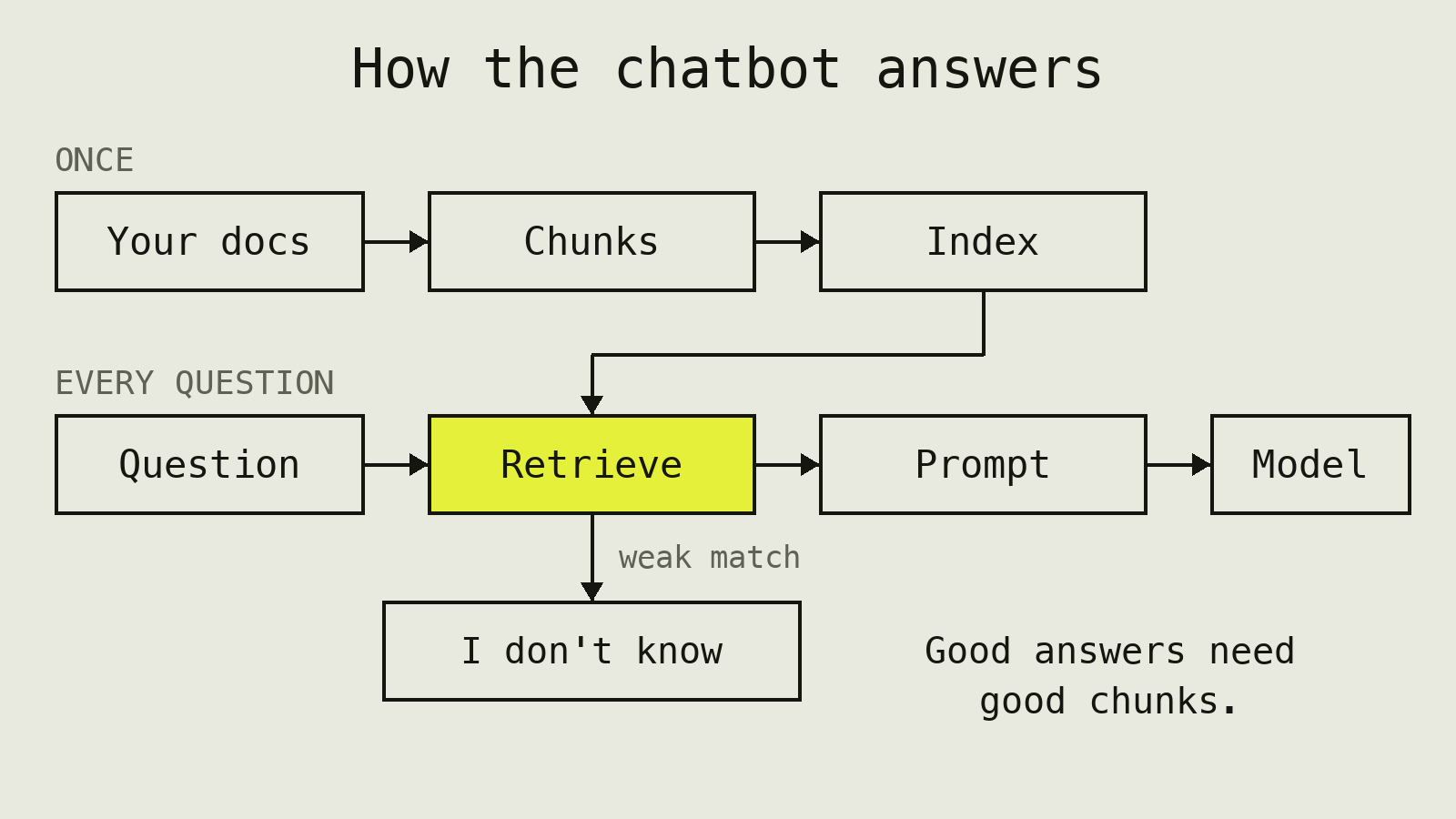
There are two phases. You build an index once, and then for every question you search that index and ask the model to answer from what it found.
- Chunk: split your documents into small passages.
- Index: count which words appear in which passage.
- Retrieve: score every passage against the question and keep the best four.
- Prompt: paste those passages, numbered, above the question.
- Answer: send it to the model with rules: use only these sources, cite them, admit gaps.
We ran the retrieval steps on six of our own Workbench guides, about 10,400 words. You can use any folder: product docs, meeting notes, a policy handbook.
Step 1: Set up the folder
Why: one folder, one file and one prompt keep everything visible.
Do this: make a folder called rag-bot. Inside it, make a folder called docs and copy in your .md or .txt files. Then create rag.py and system_prompt.txt next to it.
rag-bot/
  rag.py
  system_prompt.txt
  docs/
    your-first-doc.md
    your-second-doc.txt
Start rag.py with the settings. Each one is a dial you will turn later.
"""A RAG chatbot from scratch: Python standard library only.

Usage:
  python3 rag.py "How do I install Claude Code?"      # one question
  python3 rag.py                                     # chat loop
  python3 rag.py --show "your question"              # also print what was retrieved

With ANTHROPIC_API_KEY set, it asks Claude. Without it, it runs a free dry run:
retrieval happens for real and it tells you what it would send.
"""
import json, math, os, re, sys, urllib.error, urllib.request
from collections import Counter
from pathlib import Path

DOCS = Path(__file__).parent / "docs"   # put your .md or .txt files here
CHUNK_WORDS = 180                       # about one short section per chunk
TOP_K = 4                               # how many chunks go into the prompt
MIN_SCORE = 5.0                         # below this, we say "I don't know"
MODEL = "claude-haiku-5-5"              # small, cheap model is enough here

STOP = set("""a an and are as at be but by can do does for from how i if in into is it
its me my of on or so that the their them then there these this to was we what when where
which who why will with you your""".split())
You should see: nothing yet. That comes in Step 4.
Step 2: Split your documents into chunks
Why: a model answers best from a few focused passages, not whole files. A chunk is one passage the bot can retrieve and cite.
Do this: add the loader. It starts a new chunk at every Markdown heading. It also starts one when a section passes 180 words. Each chunk remembers its file and heading, so answers can cite them.
# Step 1: load and chunk --------------------------------------------------------
def load_chunks(folder=DOCS):
    chunks = []
    for path in sorted(p for p in folder.iterdir() if p.suffix in (".md", ".txt")):
        heading, buf = path.stem, []
        for para in re.split(r"\n\s*\n", path.read_text(encoding="utf-8")):
            para = para.strip()
            if not para:
                continue
            if para.startswith("#"):                 # a new section starts a new chunk
                flush(chunks, path.name, heading, buf)
                heading, buf = para.lstrip("# ").splitlines()[0], []
                continue
            buf.append(para)
            if sum(len(p.split()) for p in buf) >= CHUNK_WORDS:
                flush(chunks, path.name, heading, buf)
                buf = []
        flush(chunks, path.name, heading, buf)
    return chunks

def flush(chunks, source, heading, buf):
    if buf:
        text = "\n\n".join(buf)
        chunks.append({"id": len(chunks), "source": source, "heading": heading,
                       "text": text, "terms": tokens(heading + " " + text)})

def tokens(text):
    words = re.findall(r"[a-z0-9]+", text.lower())
    return [stem(w) for w in words if w not in STOP and len(w) > 1]

def stem(word):
    # crude on purpose: "citations", "cited" and "cite" all become "cit"
    for end in ("ations", "ation", "ings", "ing", "ed", "es", "s", "e"):
        if word.endswith(end) and len(word) - len(end) >= 3:
            return word[: -len(end)]
    return word
The stem function trims word endings so "citations" and "cited" count as the same word. Our first version did not have it. That cost us a wrong answer, and you will see it below.
You should see: our six guides became 106 chunks.
Step 3: Build the search index
Why: retrieval needs a score that says "this passage fits this question". We use BM25, the classic search-engine formula described by [5]. It rewards rare words that appear in a passage, and it stops long passages from winning just by being long.
Do this: add the index and the search.
# Step 2: index (BM25, the classic search-engine score) --------------------------
class Index:
    def __init__(self, chunks, k1=1.5, b=0.75):
        self.chunks, self.k1, self.b = chunks, k1, b
        self.tf = [Counter(c["terms"]) for c in chunks]
        self.len = [len(c["terms"]) for c in chunks]
        self.avg = sum(self.len) / len(self.len)
        df = Counter(t for tf in self.tf for t in tf)
        n = len(chunks)
        self.idf = {t: math.log(1 + (n - d + 0.5) / (d + 0.5)) for t, d in df.items()}

    # Step 3: retrieve
    def search(self, question, k=TOP_K):
        q = set(tokens(question))
        scored = []
        for i, tf in enumerate(self.tf):
            s = 0.0
            for t in q:
                if t in tf:
                    f = tf[t]
                    s += self.idf[t] * f * (self.k1 + 1) / (
                        f + self.k1 * (1 - self.b + self.b * self.len[i] / self.avg))
            if s > 0:
                scored.append((round(s, 2), self.chunks[i]))
        return sorted(scored, key=lambda x: -x[0])[:k]
In plain words: idf is high for words that appear in few chunks, like "install". It is low for words that appear everywhere, like "AI". A chunk scores high when it contains the question's rare words.
You should see: nothing printed yet. On our laptop, loading and indexing all 106 chunks took about 6 milliseconds.
Step 4: Write the answer prompt
Why: retrieval picks the passages. The prompt decides what the model does with them. This is the second guard against made-up answers.
Do this: save this as system_prompt.txt. It is the full prompt our bot uses.
ROLE: You are a careful support assistant. You answer only from the sources you are given, like a librarian who points to the page.

CONTEXT: The user is asking a question about our documents. Before each question, a search step picked the most relevant passages and pasted them below as numbered SOURCES. They may not contain the answer.

STEPS:
1. Read every source. Find the sentences that actually answer the question.
2. Write the answer using only those sentences. Do not add facts from your own memory.
3. After each claim, cite the source number in square brackets, like [2].
4. Check your answer: remove any sentence that has no citation.

OUTPUT: A short answer under 120 words, then a line "Sources:" listing the file names you used.

RULES:
- If the sources do not answer the question, reply exactly: "I don't know. The documents don't cover that." Then suggest one more specific question the user could ask.
- If the sources disagree, say so and cite both.
- Never invent steps, commands, prices or links.
Then add the code that numbers the chunks and puts them above the question:
# Step 4: build the prompt ------------------------------------------------------
SYSTEM = (Path(__file__).parent / "system_prompt.txt").read_text(encoding="utf-8")

def build_prompt(question, hits):
    blocks = [f"[{n}] {c['source']} > {c['heading']}\n{c['text']}"
              for n, (_, c) in enumerate(hits, 1)]
    return "SOURCES:\n\n" + "\n\n---\n\n".join(blocks) + f"\n\nQUESTION: {question}"
Step 5: Connect Claude and run it
Why: this is the only step that costs money, so everything before it runs without a key.
Do this: add the last part. It sends one HTTPS request to the [1] with Python's built-in [6]. It also adds the "I don't know" gate and a simple chat loop.
# Step 5: ask the model ---------------------------------------------------------
def ask_claude(user_text):
    body = json.dumps({"model": MODEL, "max_tokens": 600, "system": SYSTEM,
                       "messages": [{"role": "user", "content": user_text}]}).encode()
    req = urllib.request.Request("https://api.anthropic.com/v1/messages", data=body, headers={
        "x-api-key": os.environ["ANTHROPIC_API_KEY"], "anthropic-version": "2023-06-01",
        "content-type": "application/json"})
    try:
        with urllib.request.urlopen(req, timeout=60) as r:
            data = json.load(r)
    except urllib.error.HTTPError as e:       # show the API's own message, not a traceback
        return f"API error {e.code}: {e.read().decode()[:300]}"
    usage = data.get("usage", {})
    print(f"(tokens in: {usage.get('input_tokens')}, out: {usage.get('output_tokens')})")
    return "".join(b.get("text", "") for b in data["content"])

def answer(index, question, show=False):
    hits = index.search(question)
    if show or not hits:
        for s, c in hits:
            print(f"  {s:>6}  {c['source']} > {c['heading']}")
    if not hits or hits[0][0] < MIN_SCORE:      # weak retrieval: do not guess
        top = hits[0][0] if hits else 0
        return f"I don't know. Nothing in the docs matches well enough (best score {top})."
    prompt = build_prompt(question, hits)
    if not os.environ.get("ANTHROPIC_API_KEY"):
        return (f"[dry run: no ANTHROPIC_API_KEY] Would send {len(prompt.split())} words "
                f"from {len(hits)} chunks to {MODEL}.")
    return ask_claude(prompt)

def main():
    args = sys.argv[1:]
    show = "--show" in args
    args = [a for a in args if a != "--show"]
    index = Index(load_chunks())
    print(f"Loaded {len(index.chunks)} chunks from {DOCS.name}/")
    if args:
        print(answer(index, " ".join(args), show))
        return
    while True:
        q = input("\nYou: ").strip()
        if q in ("", "quit", "exit"):
            break
        print("Bot:", answer(index, q, show=True))

if __name__ == "__main__":
    main()
First, run it free with --show, which prints what was retrieved:
python3 rag.py --show "How do I install Claude Code?"
When retrieval looks right, add your key and ask again:
export ANTHROPIC_API_KEY="your-key-here"
python3 rag.py --show "How do I install Claude Code?"
On Windows PowerShell, set the key with $env:ANTHROPIC_API_KEY="your-key-here".
What you should get
This is our real dry run, copied from the terminal:
Loaded 106 chunks from docs/
    8.19  claude-code-beginners-guide.md > Step 1: Install Claude Code
    7.69  claude-code-beginners-guide.md > Tools and resources
    7.19  claude-code-beginners-guide.md > claude-code-beginners-guide
    6.16  claude-code-beginners-guide.md > Step 3: Save your project rules in CLAUDE.md
[dry run: no ANTHROPIC_API_KEY] Would send 381 words from 4 chunks to claude-haiku-5-5.
The right section came first. Off-topic questions stop before they cost anything:
$ python3 rag.py "What's the capital of France?"
Loaded 106 chunks from docs/
I don't know. Nothing in the docs matches well enough (best score 0).
With a key, you get a short answer with numbered citations and a token count.
[FOUNDER: run python3 rag.py --show "How do I install Claude Code?" with your key and paste the real answer and the tokens line here. Then change the label to Tested.]
What it costs: our install question sends 381 words of sources, plus the prompt above. By our rough estimate that is under 1,000 input tokens. At Haiku 5.5's listed [3], even a full 600-token answer costs well under a tenth of a cent. The token line your run prints gives the real number.
The one mistake: the right answer, ranked second
Our first version had no stem function. We asked: "How do I stop AI from inventing fake citations?"
We have a guide for exactly that. It ranked second, behind a guide about writing cold emails. The cold-email guide won because its "Common mistakes" section shares two words with the question: "stop" and "fake". Our research guide says "cite" and "cited", never "citations". Plain keyword search treats those as different words.
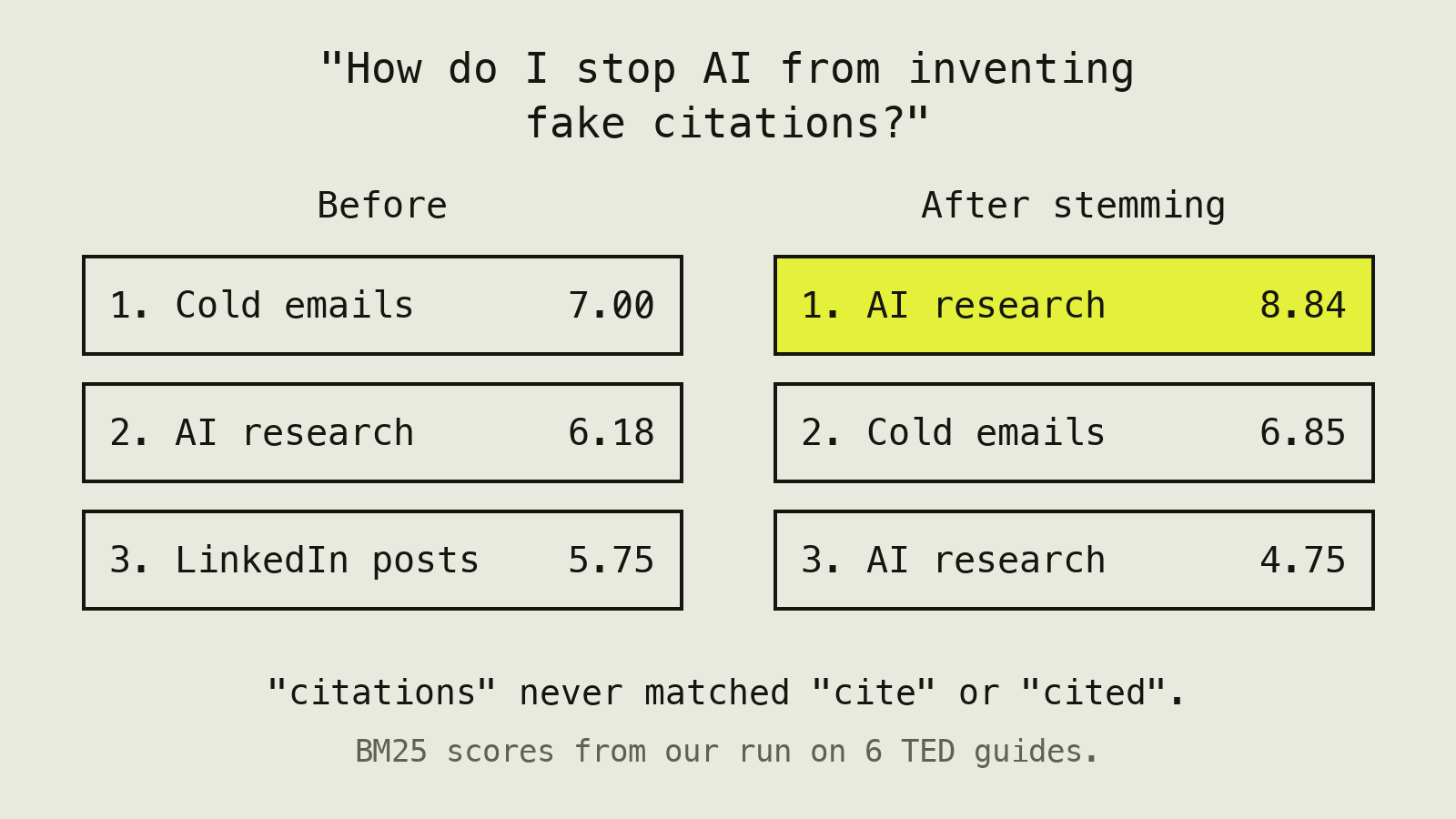
The fix was the six-line stem function in Step 2. After it, the right guide jumped to first with a score of 8.84.
The second surprise came from the "I don't know" gate. We first set MIN_SCORE to 4.0. Then we asked about a refund policy for "TED Pro", which does not exist. It scored 4.21 and passed. The only match was the word "Pro" in a table listing Claude plans. We raised the gate to 5.0, and the bot now refuses.
The lesson: always run with --show first. Look at what was retrieved before you judge the answer. Most wrong answers in RAG are retrieval problems, not model problems.
[FOUNDER: anything that broke or surprised you on your own run, in your words.]
When to outgrow this version
This bot is for learning and for small document sets. Here is where it breaks:
- Different words, same meaning. Keyword search misses "refund" when your docs say "money back". The next step is embeddings, which match by meaning. You would swap out the
Indexclass and keep everything else. - Thousands of documents. Scoring every chunk is fine for hundreds. For tens of thousands, use a real search index or a vector database.
- Follow-up questions. Each question is answered alone. To support "and on Windows?", send the last few turns along with it.
- The score gate is a guess. We tuned 5.0 on six guides. Ask 20 real questions, note the scores of good and bad matches, and set yours from that.
Frequently asked questions
Do I need a vector database for RAG?
No, not to start. A vector database stores embeddings for search by meaning. For a few hundred chunks, the keyword search in this guide works and costs nothing. Add embeddings when users ask in words your documents don't use.
Do I need LangChain to build a RAG chatbot?
No. This guide uses only Python's standard library. Frameworks help later with many data sources and tools. Building it by hand first shows you what those frameworks are doing for you.
What chunk size should I use?
Start with one section per chunk, capped near 180 words, as we did. Chunks that are too small lose context. Chunks that are too big bury the answer. Check with --show on real questions and adjust CHUNK_WORDS.
How do I stop the chatbot from making things up?
Use two guards. First, refuse in code when the best retrieval score is weak. Second, tell the model to answer only from the numbered sources and to cite every claim. Neither guard is perfect, so citations let readers check the answer.
How much does each question cost?
It depends on how much text you send. Our test questions sent 263 to 819 words. With Claude Haiku 5.5's listed prices, that is a small fraction of a cent per question. Your token line shows the real count.
Next step
Point DOCS at a folder you actually use, ask it five questions you already know the answers to, and read the --show output for each. If you want help writing or changing the code, our Claude Code beginner's guide shows how to work with an AI coding assistant safely. For checking an AI's sources by hand, see how to use AI for research without fake facts. And before you pick a model, read cost per successful task.
[FOUNDER: one line on what you'll point it at next.]
Sources
- Messages API reference, Anthropic (platform.claude.com)
- Models overview, Anthropic (platform.claude.com)
- Pricing, Anthropic (platform.claude.com)
- Retrieval-Augmented Generation for Knowledge-Intensive NLP Tasks, arXiv (Lewis et al.) (arxiv.org)
- The Probabilistic Relevance Framework: BM25 and Beyond, Foundations and Trends in Information Retrieval (Robertson and Zaragoza) (staff.city.ac.uk)
- urllib.request, Python documentation (docs.python.org)
Spot an error? Tell us. See how we handle sources and corrections in our editorial standards.
Found this useful? Get The Weekly Desk, one concise email a week.